Allow read access
Turn on Heart & HRV, Activity & Workouts, Sleep, and Body & Vitals. Body & Vitals starts off. You can change this later in the app, or revoke access in Settings under Health.
iPhone app · Apple Health · On device
Healthspool reads the Apple Health categories you allow and builds Markdown, JSON, and CSV on your iPhone. Paste a prompt into ChatGPT, Claude, or Grok, share the file, or send it to a webhook you configure.
Coming soon on the App Store. Not available to download yet.
See an exportNo account. No analytics. Health data leaves the phone only when you copy it, share it, or run an automation you set up.
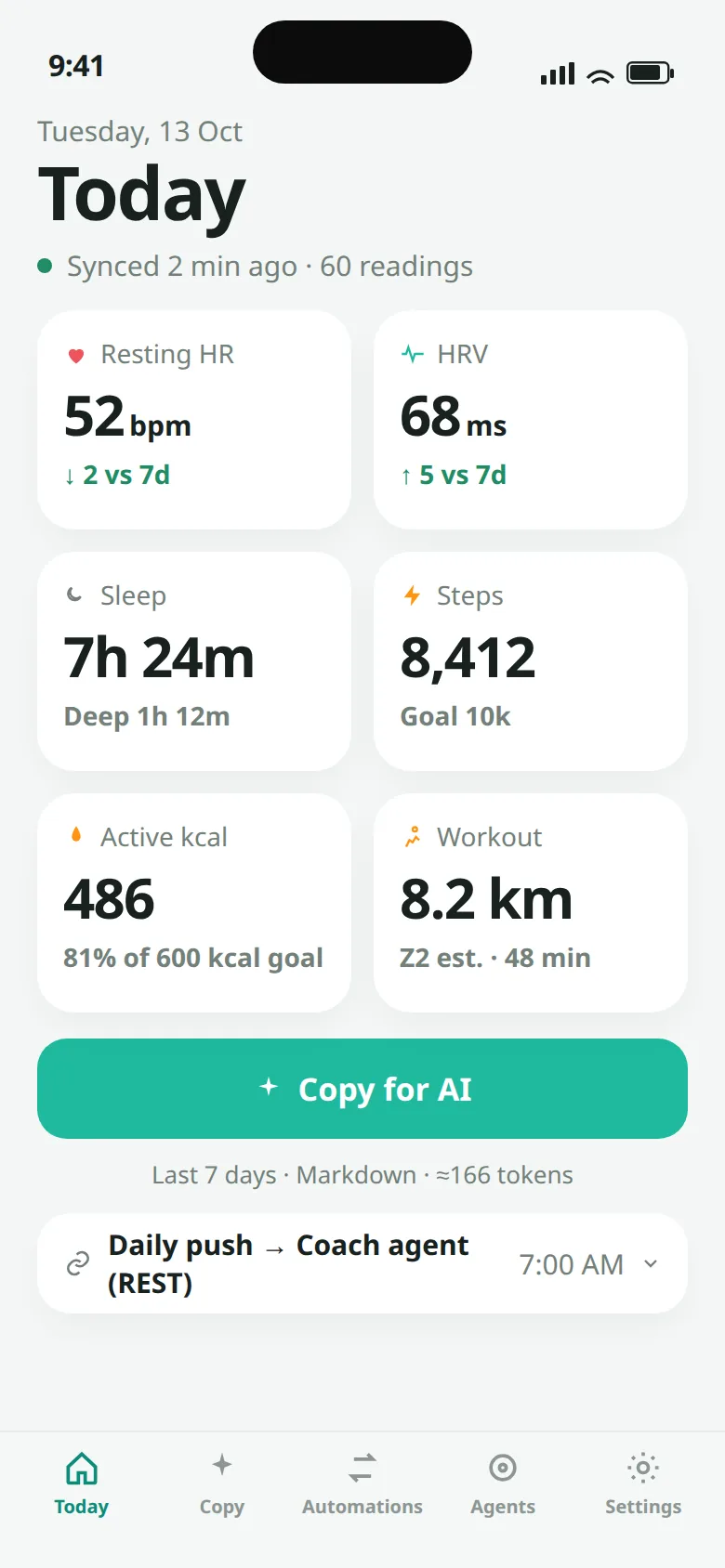
Today, using the app’s sample data. These are not a person’s Apple Health records.
How it works
Healthspool is a personal export tool for iOS 17 or later. It does not write to Apple Health, and it is not a medical device.
Turn on Heart & HRV, Activity & Workouts, Sleep, and Body & Vitals. Body & Vitals starts off. You can change this later in the app, or revoke access in Settings under Health.
Pick metrics, a date range, and Markdown, JSON, or CSV. Free covers the last 7 days. The Weekly coach review template is included. Longer history and the other templates are part of Pro.
Copy the text or share the file. With Pro, POST it to an https webhook or save it under On My iPhone → Healthspool. Manual sends run immediately; hourly, daily, and weekly background times are best-effort requests to iOS, not exact alarms.
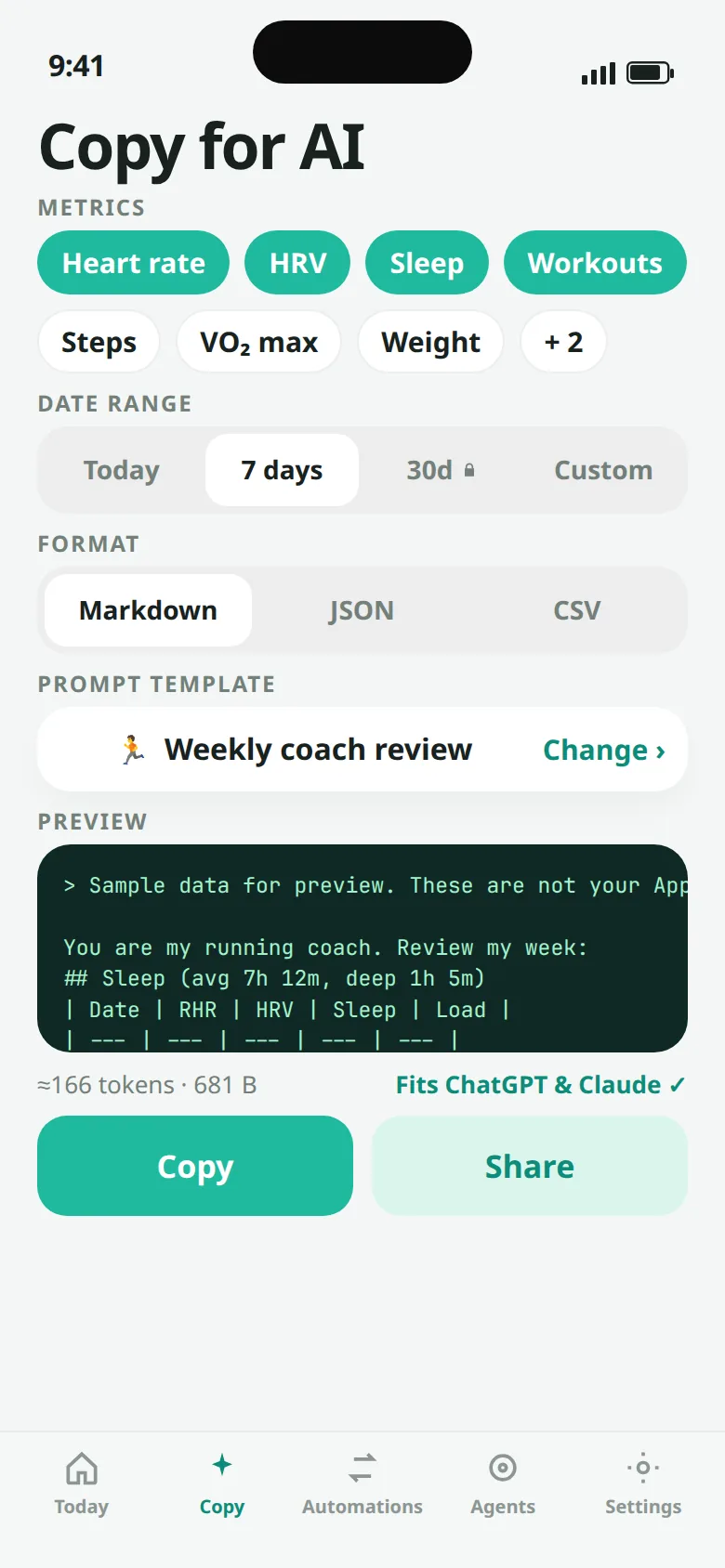
The 30-day range is locked on Free. JSON stays in the Health Auto Export v2 shape. Templates wrap Markdown.
Copy for AI
Markdown starts with a template. Weekly coach review is included. Sleep analysis and Training load are part of Pro. The app estimates size at about four characters per token. Exports inside that common paste window fit ChatGPT, Claude, and Grok.
You are my running coach. Review my week:
## Sleep (avg 7h 12m, deep 1h 5m)
| Date | RHR | HRV | Sleep | Load |
| --- | --- | --- | --- | --- |
| 10-07 | 54 | 63 | 7:10 | — |
| 10-08 | 54 | 63 | 7:10 | — |
| 10-09 | 54 | 63 | 7:10 | — |
| 10-10 | 54 | 63 | 7:10 | — |
| 10-11 | 54 | 63 | 7:10 | — |
| 10-12 | 54 | 63 | 7:10 | — |
| 10-13 | 52 | 68 | 7:24 | 57 |

## Workouts
- 10-13 · Running · 48m · 8.2 km · avg HR 128 · Z2

Daily values are aggregates from Apple Health on this iPhone. Load is a simplified TRIMP score from workout duration and average heart rate. This is not medical advice.
{
  "data": {
    "metrics": [
      {
        "data": [
          { "date": "2026-10-13 00:00:00 +0000", "qty": 52, "source": "Apple Watch" }
        ],
        "name": "resting_heart_rate",
        "units": "count/min"
      }
    ],
    "workouts": [
      {
        "duration": 2880,
        "end": "2026-10-13 07:48:00 +0000",
        "id": "sample-run",
        "name": "Running",
        "start": "2026-10-13 07:00:00 +0000"
      }
    ]
  }
}
record_type,name,start,end,qty,units,source,stage,distance_km,energy_kcal,avg_hr_bpm
metric,resting_heart_rate,2026-10-13 00:00:00 +0000,,52,count/min,Apple Watch,,,
workout,Running,2026-10-13 07:00:00 +0000,2026-10-13 07:48:00 +0000,2880,s,Apple Watch,,8.2,320,128
Sample week, not a person’s records. This Markdown is the coach export: 149 tokens and 612 bytes by the in-app estimate (characters divided by 4, rounded up). With the sample-data banner the app adds, the same week is 166 tokens and 681 bytes. JSON uses data.metrics and data.workouts. Sample exports add healthspool.sample. The sample workout id is sample-run. Sleep points add endDate and a stage such as asleepDeep. Dates use yyyy-MM-dd HH:mm:ss Z.
Automations · Pro
Pro can POST Markdown, JSON, or CSV to an https webhook, or write the file under On My iPhone → Healthspool in the Files app. iCloud Drive is not used. Automations can be manual, hourly, daily, or weekly.
.local, loopback, private LAN addresses, and link-local 169.254.0.0/16. Redirects are not followed.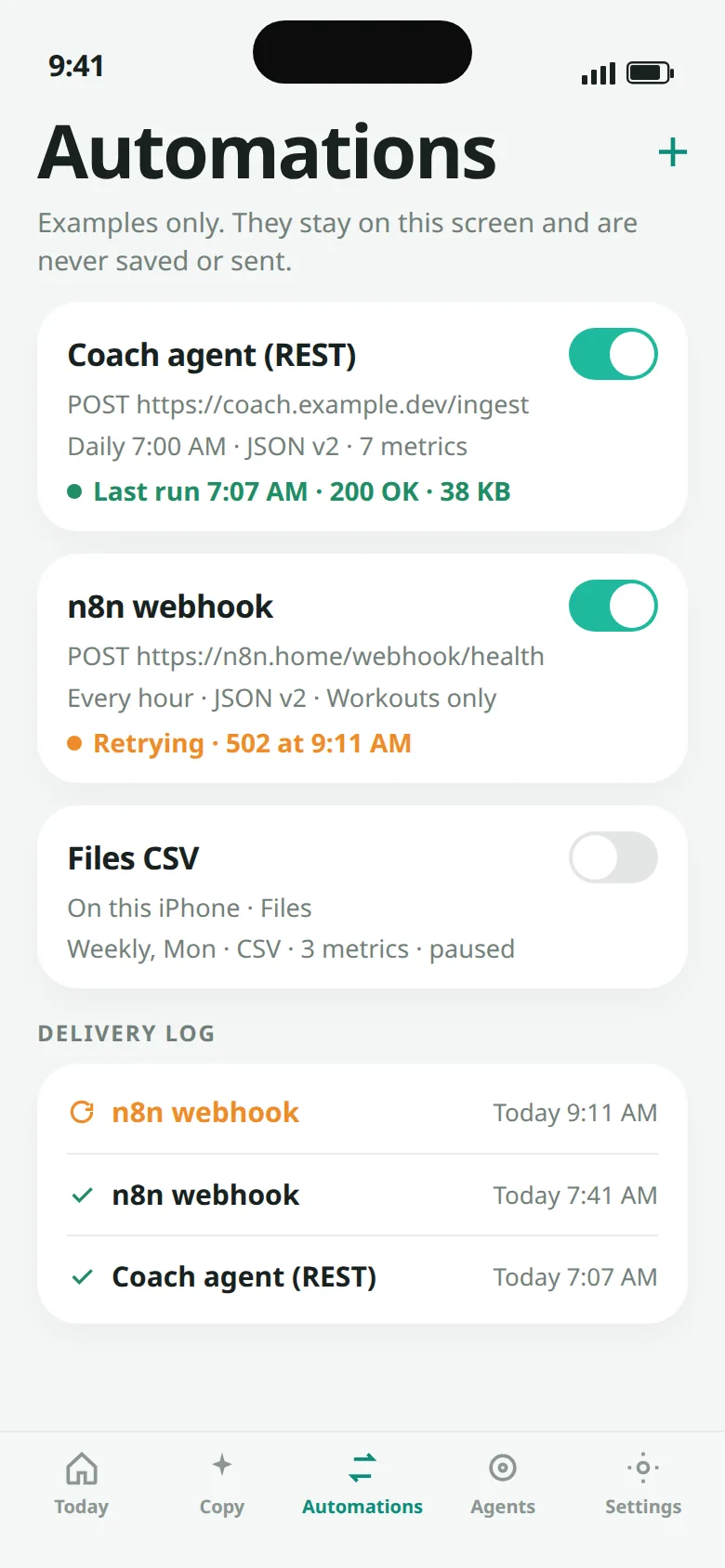
Example automations from the app. They are not saved or sent.
What you can export
A coach-style prompt with a table. Weekly coach review is free. Sleep analysis and Training load need Pro. The closing line says the export is not medical advice.
Health Auto Export v2 shape: data.metrics[] and data.workouts[]. Quantity points have date, qty, and source. The template does not wrap JSON.
One header for metrics and workouts: record type, name, start, end, quantity, units, source, sleep stage, distance, energy, and average heart rate.
Privacy
Health samples, automations, and the delivery log stay in the app sandbox. There is no account and no analytics SDK. The privacy manifest sets tracking to off and lists no collected data types.
Pricing
US catalog prices from the app. The App Store shows the price for your storefront. Healthspool is not on the App Store yet, and this website does not sell the app.
Last 7 days. Manual copy and export in Markdown, JSON, or CSV. Weekly coach review.
One-time purchase. Full history, every prompt template, webhook automations, and exports under On My iPhone → Healthspool. Background times are best-effort because iOS decides when tasks run. No subscription.
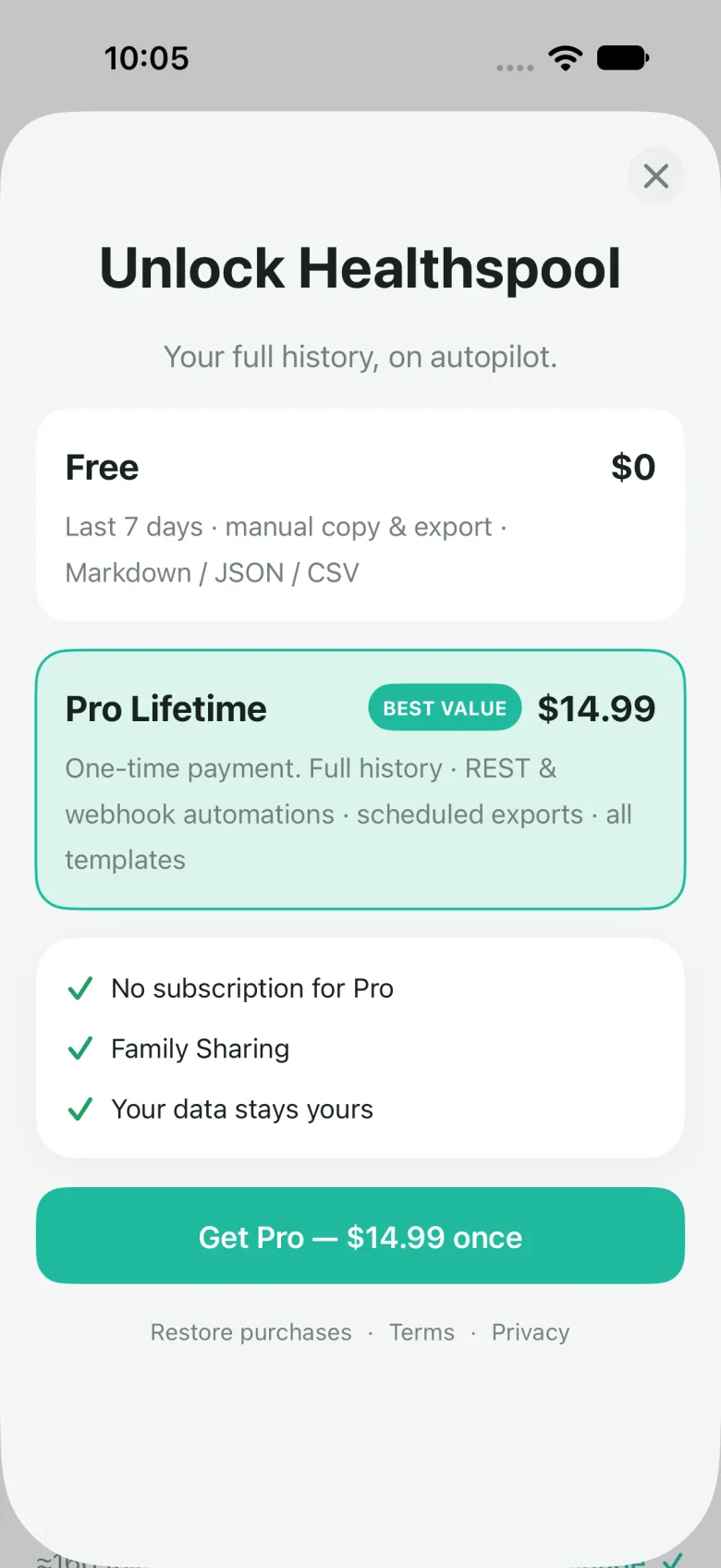
Purchases, when the app is on the App Store, are processed by Apple. Healthspool does not receive your card number. You can restore purchases from the paywall or from Settings.
v1 offers Free and the one-time Pro Lifetime purchase only. Cloud and the Agents tab are hidden, and there is no hosted endpoint or Cloud subscription to buy.
Cloud
A future release may add a hosted, read-only endpoint for ChatGPT, Claude, Grok, and custom agents. v1 does not show an Agents tab or sell a Cloud plan.
FAQ
No. Exports are built on the iPhone. Data leaves only if you copy it, share it, or run an automation whose destination you entered.
Manual Markdown, JSON, and CSV for the last 7 days, and the Weekly coach review template. The 30-day preset and ranges outside that window need Pro. Sleep analysis and Training load need Pro even inside 7 days.
No. v1 does not show the Agents tab or offer a Cloud plan. No hosted endpoint or website signup list is active.
On My iPhone → Healthspool in the Files app. iCloud Drive is not used. A successful delivery log entry includes the saved filename and folder.
No. Healthspool does not diagnose, treat, cure, or prevent any condition. Training load is a simplified score, and heart-rate zones assume a max of 190.
iOS 17 or later. The app is portrait-only.
Cloud
There is no working signup list today, so this site does not ask for your email. This page will be updated if Cloud becomes available.
Nothing to submit: no account, email address, or health export is collected here.